Weird Experience - Emisar D4V2

Candle Power Forums

Help Support Candle Power:

Orion

Flashlight Enthusiast
Bronze Member
Joined
Jun 27, 2002
Messages
1,860
City & State/Province
Missouri
Yesterday, when I got home from work, I was putting my keys, wallet, flashlight, etc on the place next to the front door. I looked at my grey Emisar, sitting where it usually sits, and it was on low. I pushed the button to turn it off, and it didn't do anything. So I pressed it again, and it flashed like a strobe light. I messed with it some, and eventually it went off. I set it down, and it went full bright on its own. I pushed the button again to turn it off. I again turned itself on bright. This time, I held the button so it would go down to its lowest setting, then clicked it off. Again, it immediately turned on and went to full.
I took the battery out to see if it were low, but it was near full charge. I took the battery out of the green Emisar and switched them between the two. Both acted normal. I switched batteries again, and both acted normal. It hasn't done this again since. But when I'm gone, I am now scared it might happen to another of my Emisar flashlights. I have 5 in total. I wouldn't want to be away from home and one turn on full bright and potentially damage the light.
 
Last edited:
turned itself on bright.
Possible metal filings causing a short?

Interventions include,
1. cleaning out all old lube that may be contaminated with metalic particles..
2. close visual inspection under magnification looking for metal fragments between the driver and head, and between tailcap board that has the spring on it, and the tailcap..
3. if you have compressed air, blow out those gaps

With this grey one, there is another "click" after the second,...when the button is released.

Possible loose switch retaining ring or loose tailspring retaining ring, or loose retaining ring in the head, if your light has one?

intervention includes
1. using a tool to check the retaining rings are tight

Possible switch is staying pressed (if it has a metal switch button)?

intervention includes
1. close observation to note if metal switch button is rebounding freely and not sticking around the edges
2. inspect for lint or dirt particles stuck around the edge of the metal switch button

Things it is not:
1. Poltergeist
2. Battery
 
Last edited:
Yesterday, when I got home from work, I was putting my keys, wallet, flashlight, etc on the place next to the front door. That day I wore an outfit that caused me to take my green Emisar. Yes,...........I color code my EDC. I'll give you all a moment to process that.......

Okay, so anyway, I looked at my grey Emisar, sitting where it usually sits, and it was on low. I pushed the button to turn it off, and it didn't do anything. So I pressed it again, and it flashed like a strobe light. I messed with it some, and eventually it went off. I set it down, and it went full bright on its own. I pushed the button again to turn it off. I again turned itself on bright. This time, I held the button so it would go down to its lowest setting, then clicked it off. Again, it immediately turned on and went to full.
I took the battery out to see if it were low, but it was near full charge. I took the battery out of the green Emisar and switched them between the two. Both acted normal. I switched batteries again, and both acted normal. It hasn't done this again since. But when I'm gone, I am now scared it might happen to another of my Emisar flashlights. I have 5 in total. I wouldn't want to be away from home and one turn on full bright and potentially damage the light.

So, what do you think it was? Some weird error in the electronics.........or a ghost trying to communicate with me, yesterday?

As a related side note, this same flashlight has an odd thing about it. All my Emisar, when you click the switch, you hear two "clicks", one when pressing, and the other when you release. With this grey one, there is another "click" after the second,...when the button is released.
If it's a side switch button, can you get the retaining ring off to check it? Like @jon_slider mentioned, it could very well be a short that's triggering the light to believe that the switch has been pressed. Sometimes from the factory, there may be super thin strands of copper that are bridging connections that should not be bridged
 
I can attempt to take the switch ring off and look. It's odd that it stopped doing it. I've had this light for quite some time now. And it hasn't done it since.
 
Possible metal filings causing a short?

Interventions include,
1. cleaning out all old lube that may be contaminated with metalic particles..
2. close visual inspection under magnification looking for metal fragments between the driver and head, and between tailcap board that has the spring on it, and the tailcap..
3. if you have compressed air, blow out those gaps
Darn it, Jon -- those are such sensible, down to earth ideas! Where's the fun in that?

I say, that-there Emisar needs an exorcism! Or maybe Orion needs to sacrifice an unused 18650 to the flashlight gods!

Here's what you do, Orion -- get all of your flashlights together, and put them into a circle on the ground, pointing outwards. Now, you do a dance, jumping in and out of the circle, chanting, "Light Goes Off! Light Goes On! By the Mighty Electron! Driver, Driver, 1-2-3!, Demons, leave my LED!"

That oughta fix it. Don't listen to Slider -- he's just a spoilsport.
 
Last edited:
It's odd that it stopped doing it.
Since your light seems to be possessed, I agree with

lampeDépêche, that you should do an exorcism ;-)

After that I suggest you do a Factory Reset.. (the Devil 👿 is in the Details)
First let the light get to room temperature.. dont do the Factory Reset while the light is Hot

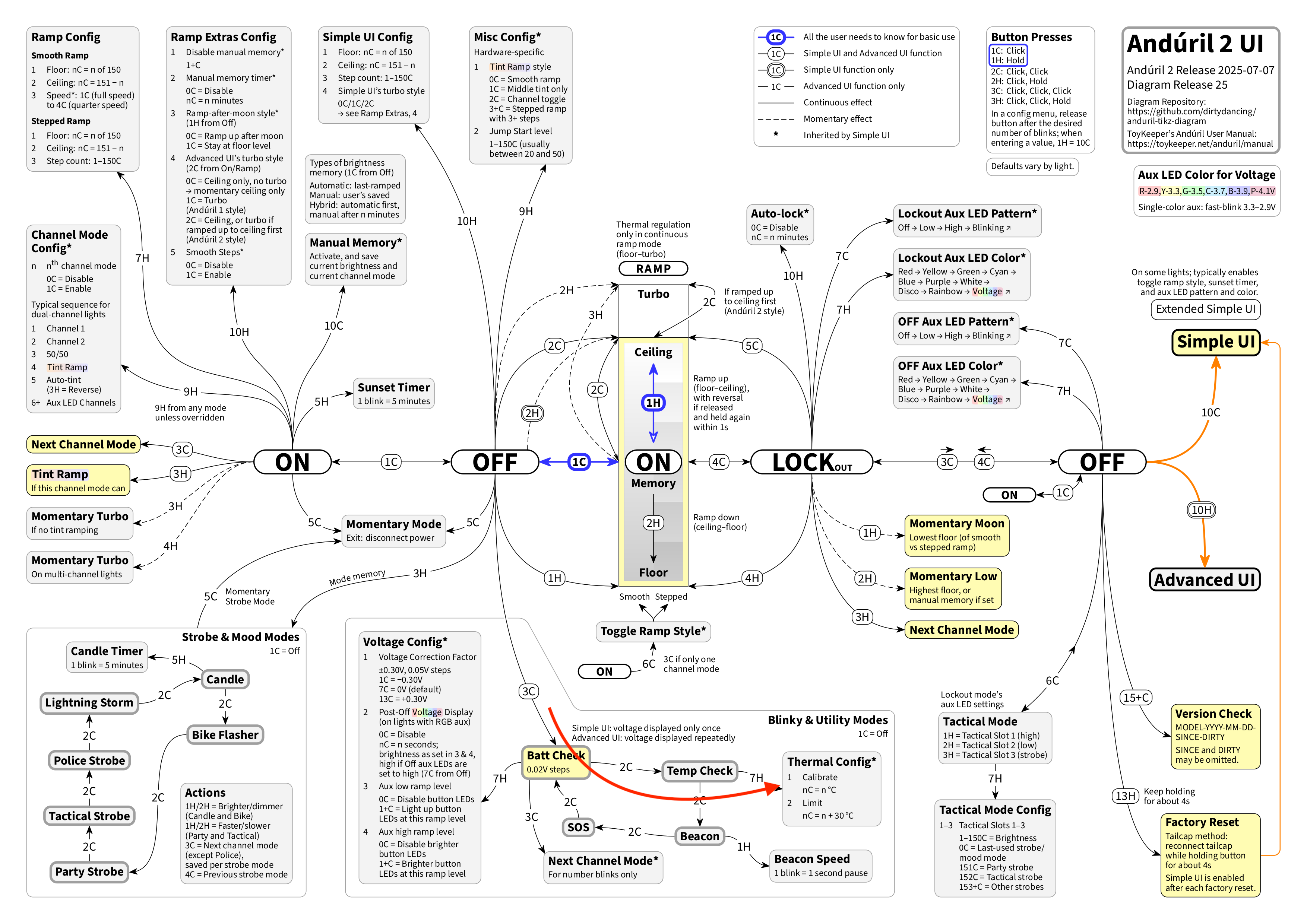
Factory Reset is 13H from Off..
keep holding until the light finishes ramping up and then gives a bright flash and turns off.

Then do a battery check (3C from Off), to determine if the light is in Advanced (battery blinks repeat in a loop). If the light is in Simple UI, the battery blinks will turn off by themselves.. that tells you it is necessary to get into Advanced UI by doing 10H from Off..

do you understand?

while the light is doing battery check blinks, do a Temperature check (from off do 3C to start battery check, then while blinking do 2C)...

then count the blinks to determine what temperature the light thinks it is at.. (temperature repeats in a loop, slow flash = 10, quick flash = 1)

if the result is very different than your room temp.. recalibrate the Thermal Sensor by doing 7H while it is blinking out what it thinks is the temperature, release on first flash.. and clic in the room temp.. (to enter 25C for example, do Long Hold 2 times, plus clic 5 times.. (1 long hold = 10 fast clics)

let me know if you need help with those things

here is a link to the online manual for more details

and here is a flowchart to reinforce what you learn from the manual:
dirtydancing 2025-07-07.png
 
it went full bright on its own....
It has only done it a couple times
what if the next time, the poltergeist turns the light on while you are sleeping,
or not home again?

any chance it could start a fire?

Maybe you would be safer if you take the battery out while you are sleeping,
or not home ...

or use Physical Lockout if you leave the battery in when not using the light

And maybe it would be good to do a Factory Reset...
to bring the firmware back to all its default settings..

and then disable Turbo, and lower the ceilings to 100 so the light cant get too hot if the poltergeist turns it on again
 
Last edited:
When I don't have it with me, I am unscrewing the tailcap.

I may see about figuring out how to disable turbo and overall output. Most of the time, these Emisar lights are too bright anyway. Turbo, for 10 seconds or more, makes them quite hot.
 
When I don't have it with me, I am unscrewing the tailcap.
good call..

if you decide to make time to disable Turbo and lower the ceilings, here are the instructions:

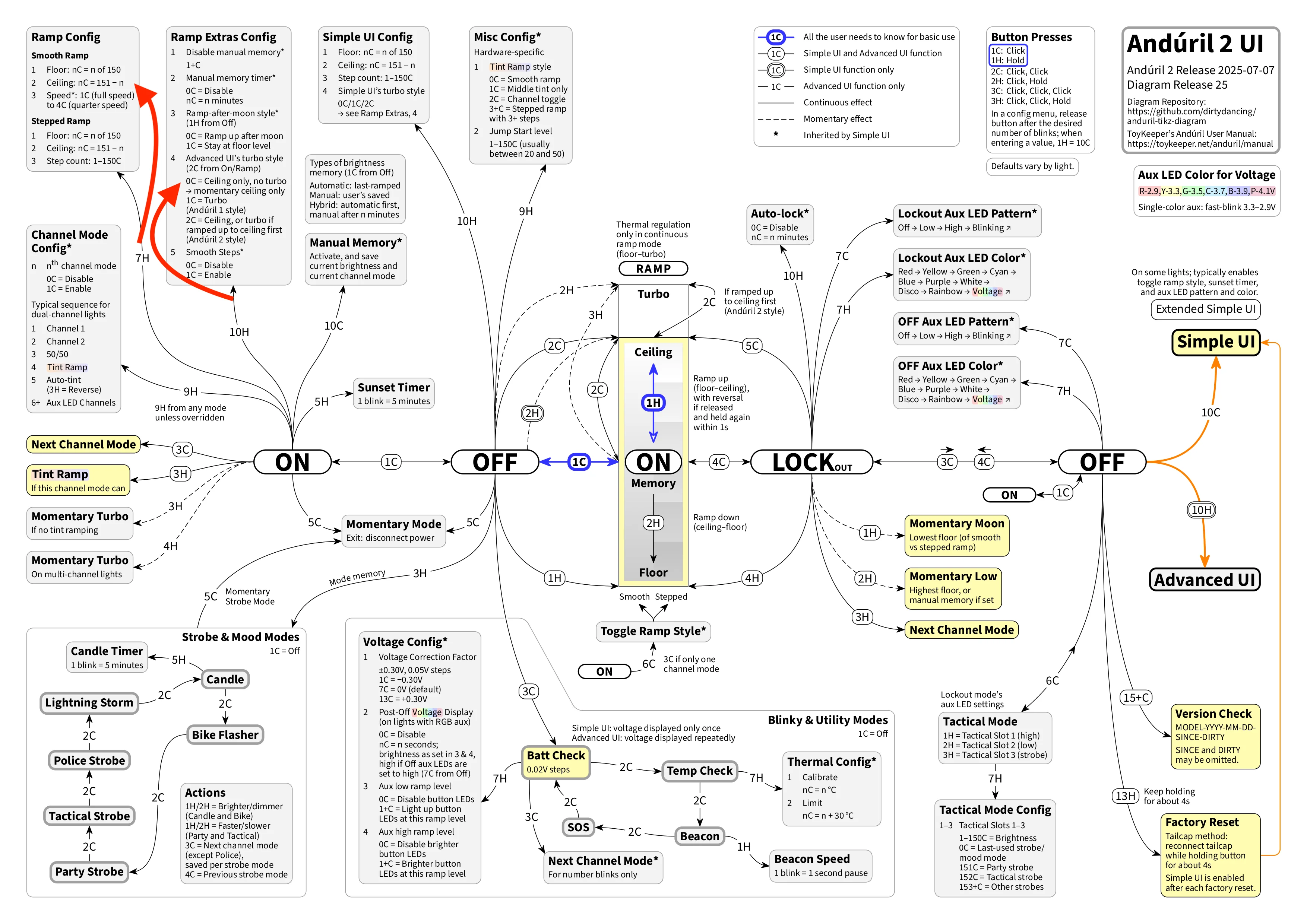
this is the procedure to disable Turbo:
from On in Advanced UI:
do 10H,
release on 4th flash, do nothing else.. just wait for the light to finish flickering..
done

this is the procedure to lower the ceiling to 100:
from On in Advanced UI
do 7H
release on the 2nd flash
do 1H five times
do nothing else.. just wait for the light to finish flickering..
done

Note there are 3 separate ceilings in Anduril, so the process of lowering the ceilings has to be repeated 3 separate times while in each of these modes:
ceiling for Advanced UI, Smooth Ramping
ceiling for Advanced UI, Stepped Ramping
ceiling for Simple UI, that affects both Smooth Ramping and Stepped Ramping by adjusting either one.

here is a flowchart marked with red arrows for those two options settings, disabling Turbo, and lowering a Ceiling:

dirtydancing 2025-07-07.webp


I recommend you read the Online Manual for more details regarding Anduril features and Options settings
 

Latest posts

Back
Top