The Official Zebralight Thread

Candle Power Forums

Help Support Candle Power:

I have SC65c HI and I like all outputs by default that Zebralight makes in H1/M1/L1, in H2/M2/L2 I make some changes (highlighted in red).

I just want to swap the High with Medium, with all the same output numbers but Medium is first and High is second.

How do I know that in G6/G7 mode I will select the same fixed numbers?

How to do this?

Thanks.

54520891205_8560b1fcb3_o.png
 
Last edited:
If I understand your question correctly and that’s an if.
All outputs are in order with 1 being the lowest and 12 being the highest. What I have done is write down the outputs next to a number 1-12 to ensure I’m choosing the output I want. In G6/G7 all levels H1, M2, etc can be any of the 12. So when programming a particular level say M2 just choose the corresponding output next to the number 1-12 on your list.
 
It's bad enough that your already limited in 18650 use with the SC64/65 series.
For what it’s worth, I have inserted a metal ring in the tail cap of the SC64 in my bugout bag. The extra length it provides allows use of most 18650s, not just specific length flat tops. More importantly, it allows me to run two CR123As. Tested and works on my other SC64/65 series as well. The downside of course is that it lengthens the light slightly and the standard rubber washer setup on the tail requires modification.
 
Of course it's going to work with some modifications or adapters, but that's not my point. You had an OEM, out of the box product, which would allow the use of both types of batteries and now you don't. That absolutely sucks and is pushing ZL even closer to a model that's not going to be globally accepted.
 
.... By the way, you may want to limit your usage of two CR123 cells. From what I understand, that voltage is way above the specs for those lights.
Actually, the SC64/65 series lights are rated up to 6.0v and two CR123As would be 6.0v. My Surefire CR123As specifically state 3.0v on the package. Some CR123As say 3.2v, but, in my testing, under load immediately drop to 3.0v or less, so I am comfortable using them in this configuration.
 
I have inserted a metal ring in the tail cap of the SC64 in my bugout bag. ... the standard rubber washer setup on the tail requires modification.
great to hear your SC64 works w 2 CR123a
can you share any details about the dimensions of the metal ring you use, and what change you made to the O ring?

Maybe share a photo showing the gap of the closed modified tailcap?
 
If I understand your question correctly and that’s an if.
All outputs are in order with 1 being the lowest and 12 being the highest. What I have done is write down the outputs next to a number 1-12 to ensure I’m choosing the output I want. In G6/G7 all levels H1, M2, etc can be any of the 12. So when programming a particular level say M2 just choose the corresponding output next to the number 1-12 on your list.

So all these numbers 660 / 437 / 244 / 157 / 66 / 27.5 / 13.6 / 4.7 / 1.3 / 0.33 / 0.11 / 0.03 are fixed and I can choose the exact (fixed) number I want in G6/G7 groups ?

1 - 660 - H1
2 - 437 - H2
3 - 244 - H3
4 - 157 - H4
5 - 66 - M1
6 - 27.5 - M2
7 - 13.6 - M3
8 - 4.7 - M4
9 - 1.3 - L1
10 - 0.33 - L2
11 - 0.11 - L3
12 - 0.03 - L4

1 Click (from OFF)
6 - 27.5
7 - 13.6

2 Clicks (from OFF)
1 - 600
4 - 157

Press & Hold (from OFF)
9 - 1.3
12 - 0.03

Can it be done just in G6 mode?
 
Last edited:
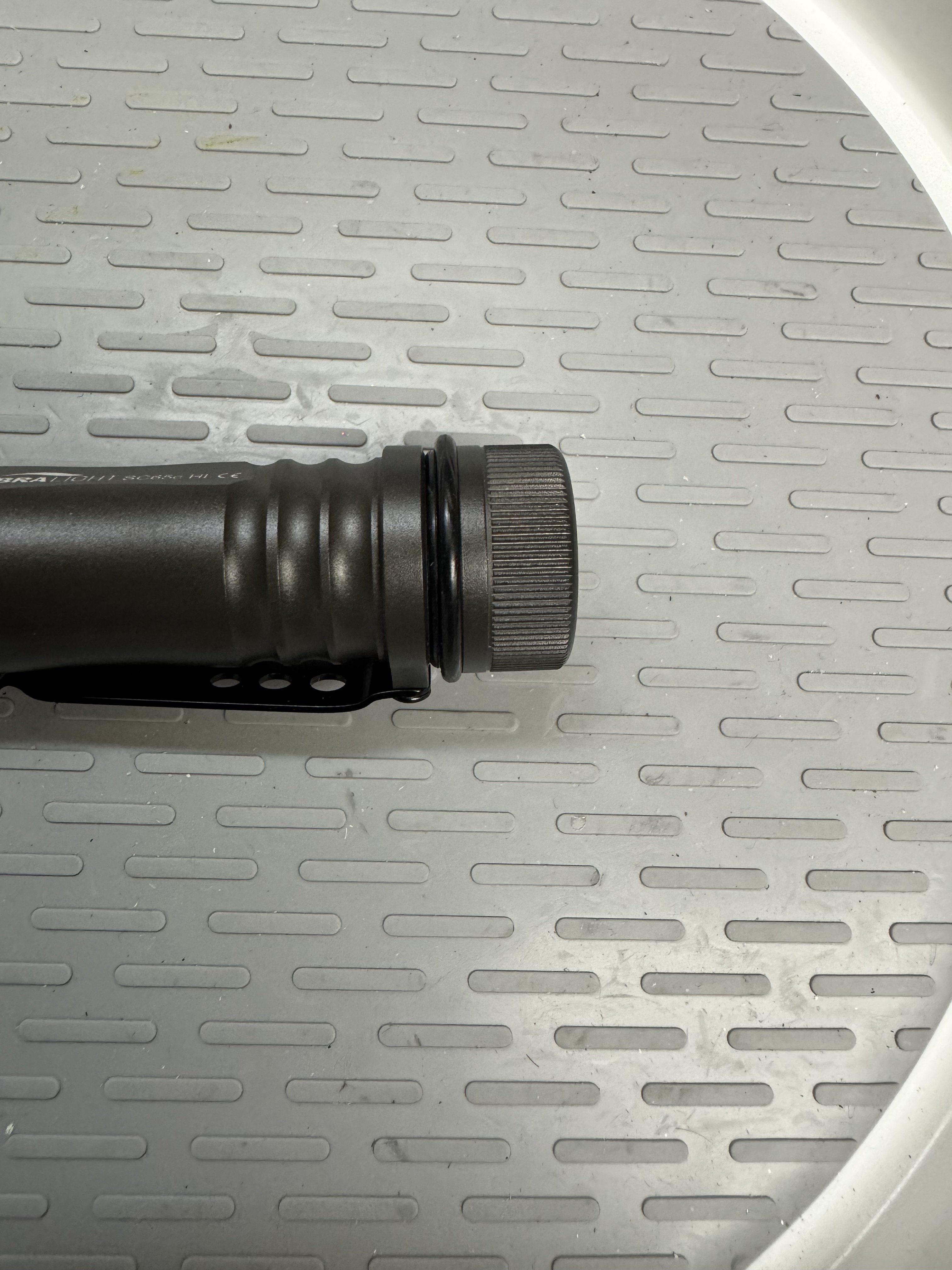
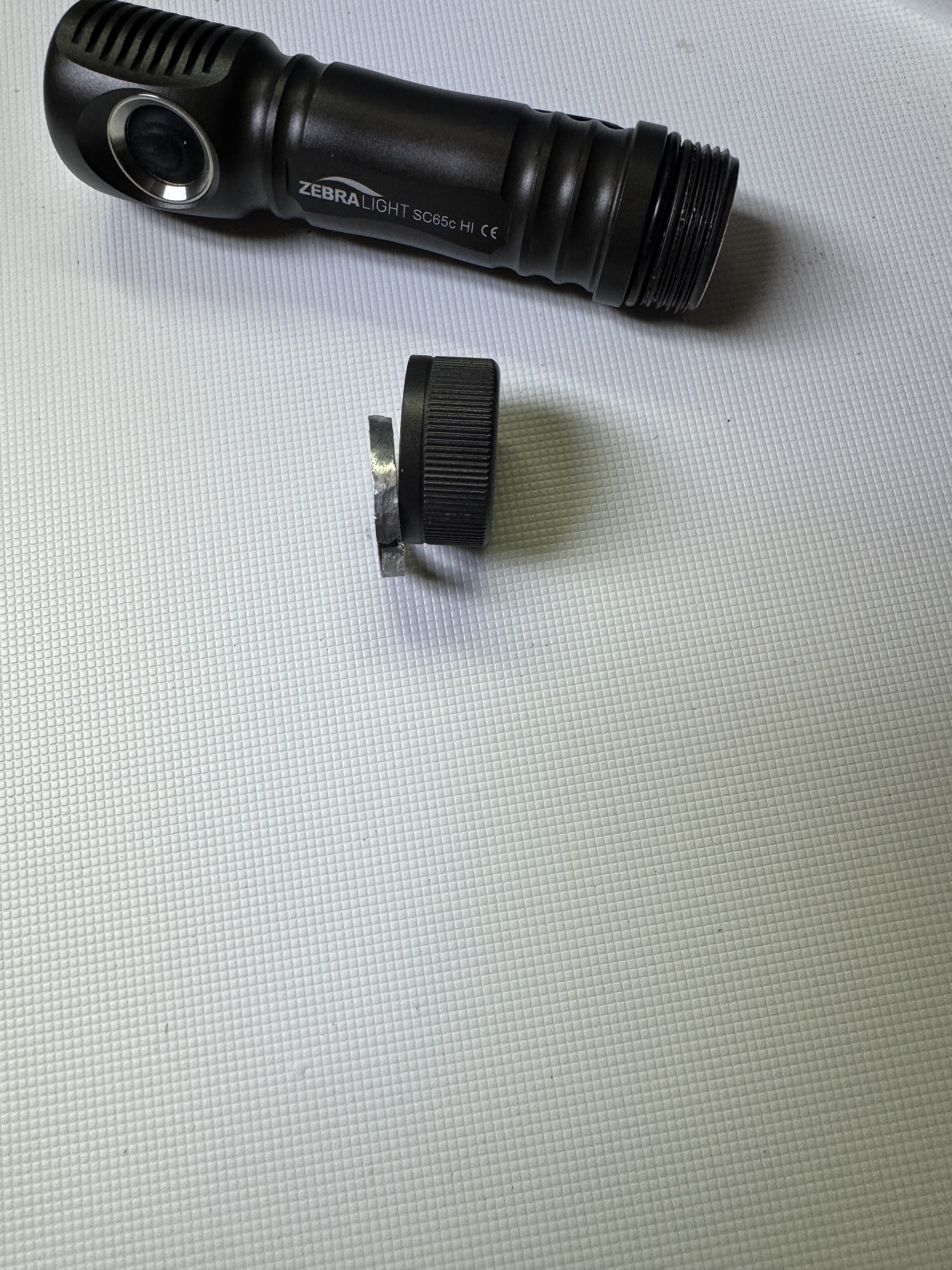
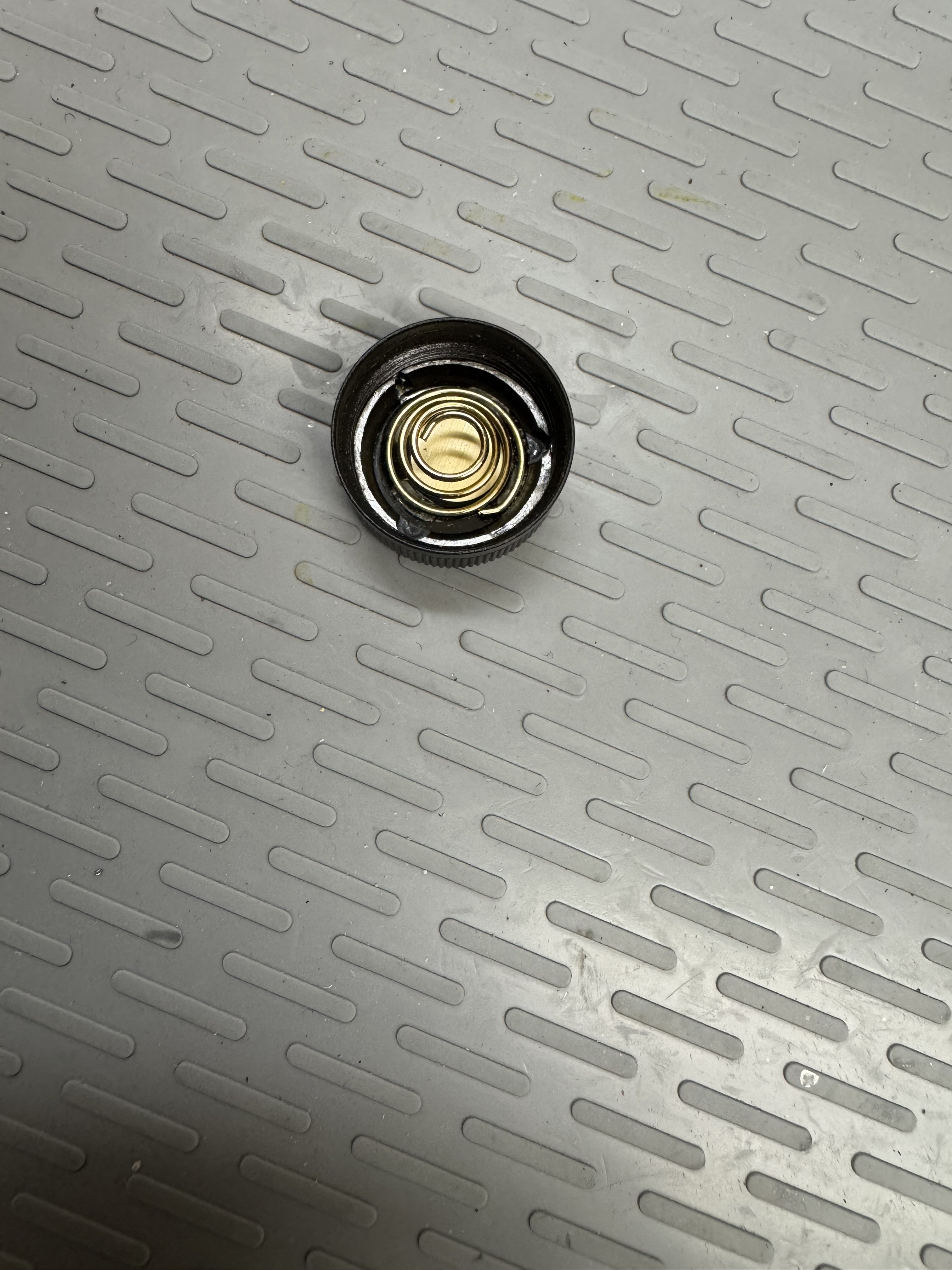
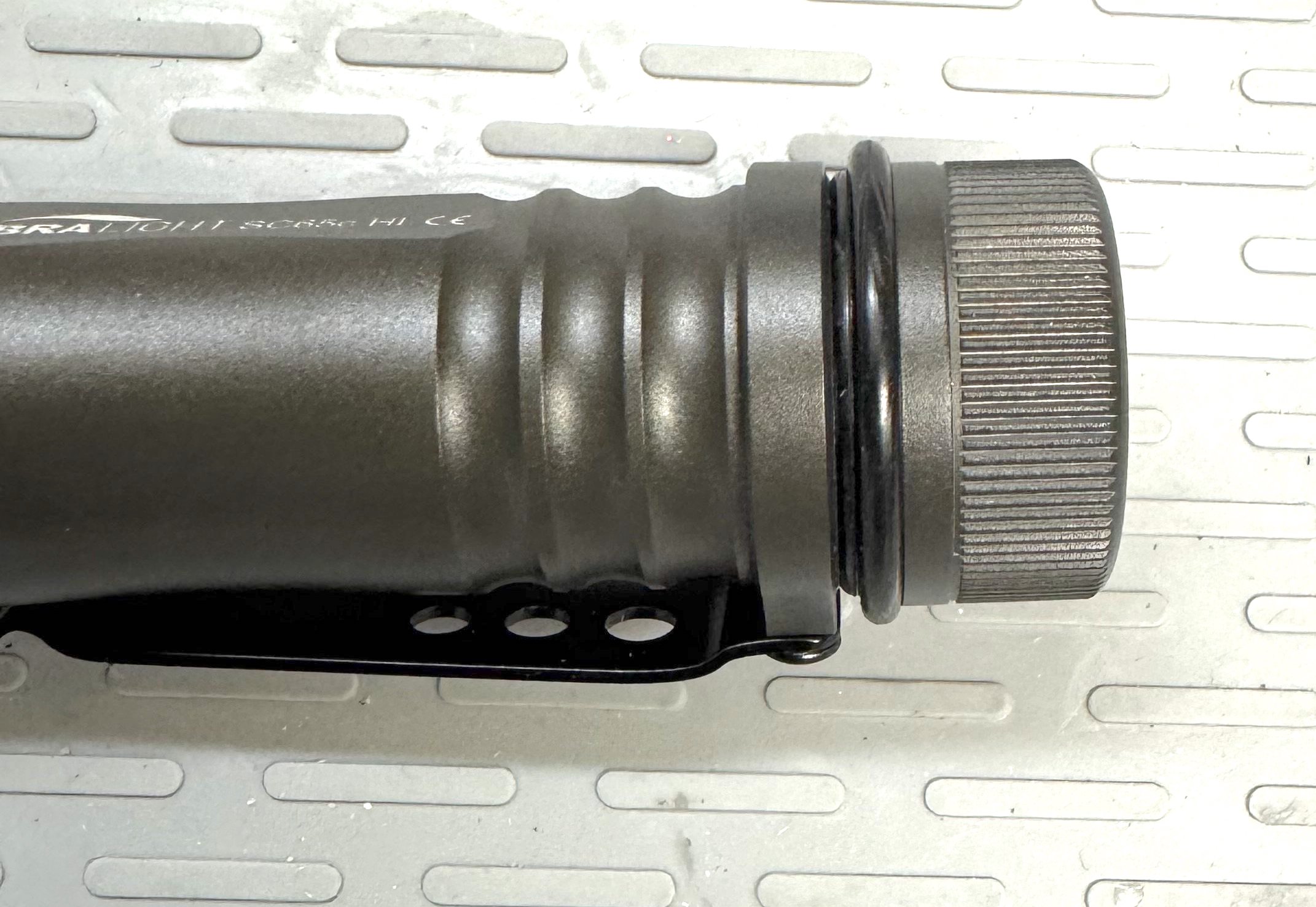
The ring is just under 4mm tall. In the past I have used more sophisticated ones that were spring material and variable from 2-5mm. Gave those setups to my son-in-laws for their bags and haven’t gotten around to crafting more like that. This one is solid. As far as the o-ring, just added another behind the one already there and good enough for my purposes.
IMG_2588.jpeg
IMG_2585.jpeg
IMG_2586.jpeg
IMG_2587.jpeg
 
The ring is just under 4mm tall.... As far as the o-ring, just added another behind the one already there
IMG_2588.jpeg


thank you very much for the detailed photos and dimensions of the added tailcap contact ring, and ORing.

I appreciate your confirmation that the 6V limit works w CR123a... in your SC65

Here is another report of successful use of 2xCR123a:
(note this use was Without adding a tailcap contact ring)
Do two CR123a work in an 18650 Zebra?

I see the voltage range is specified as 2.7V to 6V. But a pair of new CR123a would total 6.4V…
They do, however I've never used them on high output, only medium. 18650 Zebras require a higher amp draw that two CR123 (3.5amps each) can't provide. So to be safe, I've only used medium levels.

Will using high output with two CR123s be safe? I’m not sure
thanks for expressing the High Output Amperage consideration,

I agree some 18650 Zebras, such as SC700 and SC600w, draw more than 3.5A on H1

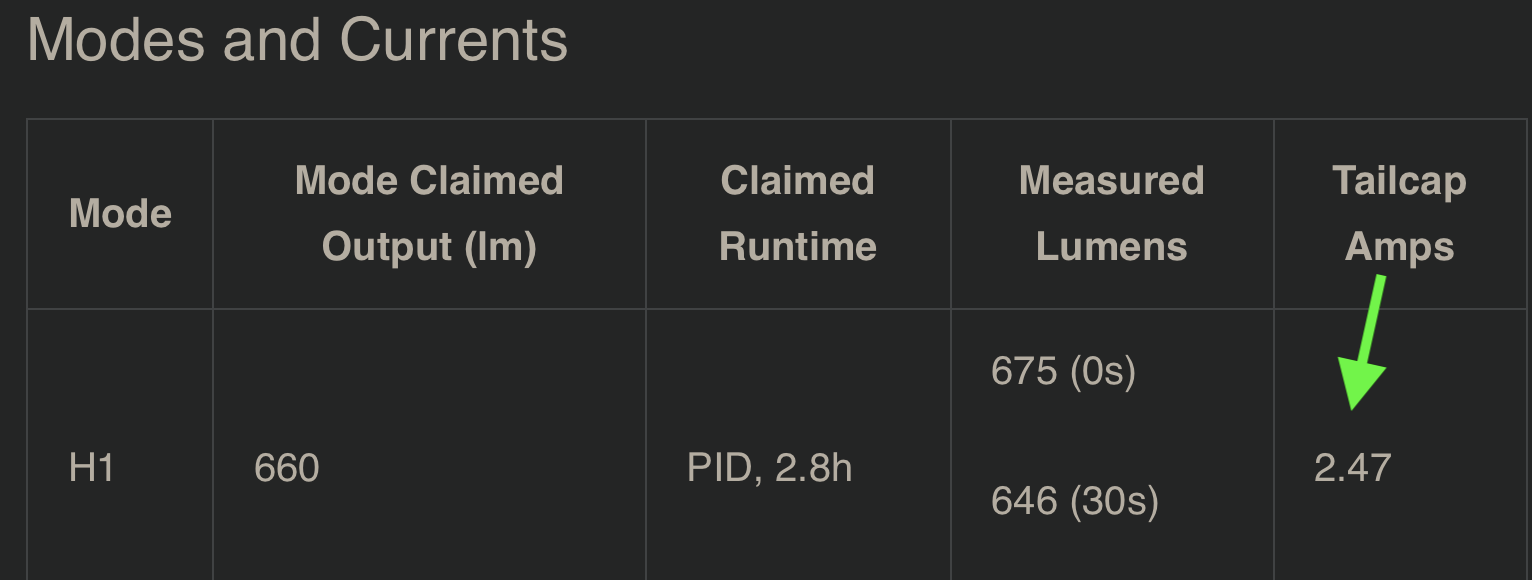
otoh, this SC65c Hi review says H1 draws just under 2.5A.. seems very encouraging:

Screen Shot 2025-05-15 at 9.57.08 AM.png


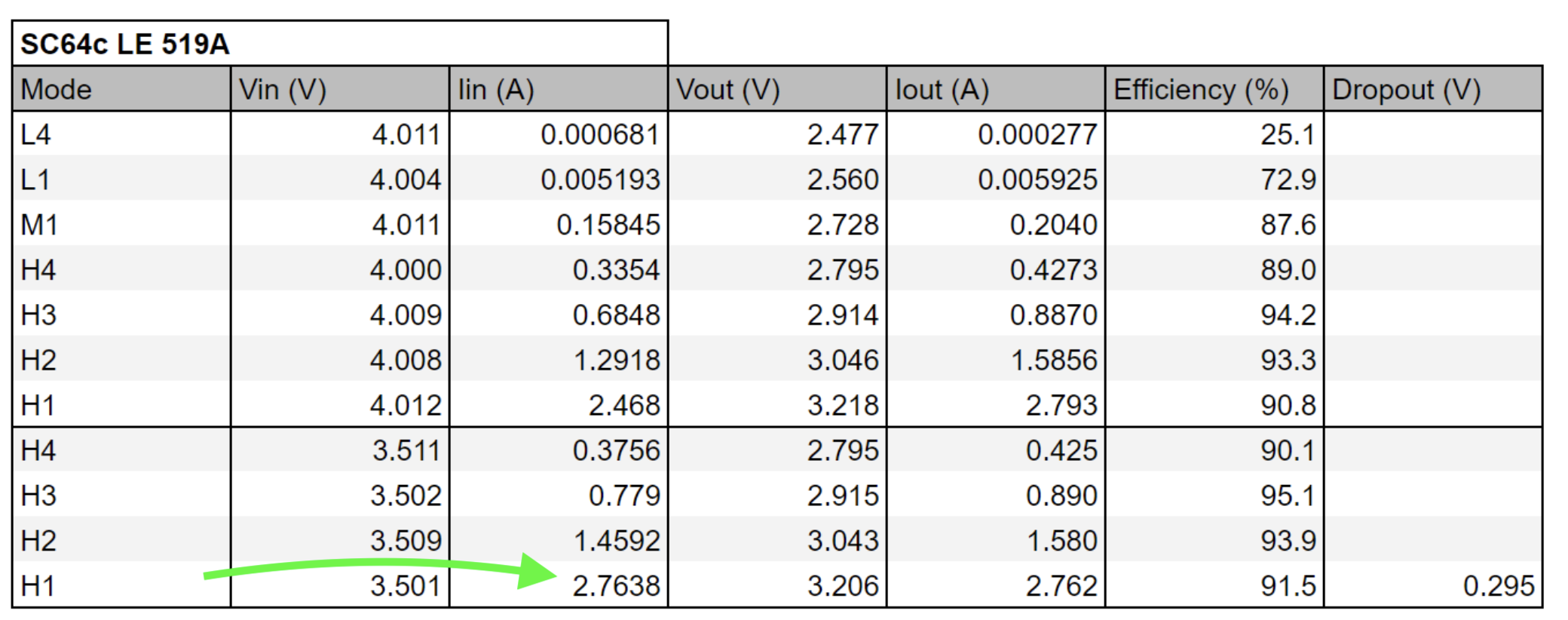
And this test of an SC64c LE says H1 Amperage is less than 3A:
Screen Shot 2025-05-15 at 10.20.29 AM.png


I note in that chart, that H2 draws less than 1.5A.. I think that is a very reasonable safe limit for CR123a...

I also tried a dummy CR123 and a Vapcell T8 16340 and it works

Thank you very much for sharing your testing results
 
Last edited:
So all these numbers 660 / 437 / 244 / 157 / 66 / 27.5 / 13.6 / 4.7 / 1.3 / 0.33 / 0.11 / 0.03 are fixed and I can choose the exact (fixed) number I want in G6/G7 groups ?

1 - 660
2 - 437
3 - 244
4 - 157
5 - 66
6 - 27.5
7 - 13.6
8 - 4.7
9 - 1.3
10 - 0.33
11 - 0.11
12 - 0.03

1 Click (from OFF)
6 - 27.5
7 - 13.6

2 Clicks (from OFF)
1 - 600
4 - 157

Press & Hold (from OFF)
9 - 1.3
12 - 0.03

Can it be done just in G6 mode?
G6 & G7 have a total of six levels combined and G5 has three levels that are user configured.
Any of those nine levels can be set to any of the twelve available outputs in any configuration you choose.
 
So all these numbers 660 / 437 / 244 / 157 / 66 / 27.5 / 13.6 / 4.7 / 1.3 / 0.33 / 0.11 / 0.03 are fixed and I can choose the exact (fixed) number I want in G6/G7 groups ?
yes
1 Click (from OFF)
6 - 27.5
7 - 13.6

2 Clicks (from OFF)
1 - 600
4 - 157

Press & Hold (from OFF)
9 - 1.3
12 - 0.03
yes, all 6 of those outputs can be assigned to G6, and to the specific clics you indicate.. (it does not matter whether you count 1-12 starting from lowest or highest, as long as you know what actual outputs you want)

well done! ;-)
 
(it does not matter whether you count 1-12 starting from lowest or highest, as long as you know what actual outputs you want)
Maybe I should have clarified my statement without assuming.
When choosing a particular output I prefer to go to the lowest output and count up the desired number of times till I reach the corresponding lumen level I want.
All twelve are in order.
 
G6 & G7 have a total of six levels combined and G5 has three levels that are user configured.
Any of those nine levels can be set to any of the twelve available outputs in any configuration you choose.

jon_slider said that all 6 of those outputs can be assigned to G6, but you said G6 & G7 have a total of six levels combined.

G6 has 6 levels and G7 has 6 levels, right?

Can I set all my settings to activate just G6 mode?

I don't understand what G7 mode is for if it can be done in only G6.
 
Last edited:
All twelve are in order.
agree
but 1-12 can be unclear, unless we specify High to Low (which is how Zebra outputs are listed), or Low to High (which also makes sense to me).

To make it even more confusing, Zebra uses terms like L1, L2, but there are actually 3 different "L2", so my way is to list them as L4, L3, L2, L1..

all methods are valid, as long as the operator has a list of corresponding outputs.

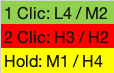
For my G6 I use this program:
Screen Shot 2025-05-15 at 1.12.57 PM.png

1747336238308.png
 
Last edited:
jon_slider said that all 6 of those outputs can be assigned to G6, but you said G6 & G7 have a total of six levels combined.

G6 has 6 levels and G7 has 6 levels, right?

Can I set all my settings to activate just G6 mode?

I don't understand what G7 mode is for if it can be done in only G6.
italian "pasta" variants can be made with the same "flour". Why bother making all the variants if they're all the same thing?

G6 and g7 are just two customizable groups of 6. In a heiarchy tree, they are independent of one another.

You can have one subset be super contrast, i.e. lowest modes and highest modes, you could set the other group to as even as possible spacing. You could even set one group to ONLY have 2 modes per sublevel, i.e. h1m1l1 all 50lumens, and h2m2l2 all max, so theres only ever 2 modes to cycle through.

after setting the modes in each group, you can freely swap between each group if necessary.
 
Last edited:
Why bother making all the variants if they're all the same thing?
In my post #6,241 I am asking if I can swap the High with Medium with all factory output settings.

I don't like to double click for low settings and turn high settings for milliseconds.

There is no option in Zebralight UI to turn (double click from OFF) Medium setting without turning ON/pass the first High (for a very short time) setting.
 
agree
but 1-12 can be unclear, unless we specify High to Low (which is how Zebra outputs are listed), or Low to High (which also makes sense to me).

To make it even more confusing, Zebra uses terms like L1, L2, but there are actually 3 different "L2", so my way is to list them as L4, L3, L2, L1..

all methods are valid, as long as the operator has a list of corresponding outputs.

For my G6 I use this program:
View attachment 78889
View attachment 78885

Thank you jon_slider , you explain it much better.
 
G6 has 6 levels and G7 has 6 levels, right?
yes
G7 is extra.. I use it to experiment, for example by setting all 6 of the lowest modes to that program group
There is no option in Zebralight UI to turn (double click from OFF) Medium setting without turning ON/pass the first High (for a very short time) setting
agree in default G5 that there is preflash of H1 when going to M1 with double clic

that is one of the reasons I reassign 2 Clic: Not to Medium but to High Instead,
and I reassign Single Clic, Not to High, but to a Low output instead.
 
Last edited:
yes
G7 is extra.. I use it to experiment, for example by setting all 6 of the lowest mode to that memory partition..

agree in default G5 that there is preflash of H1 when going to M1 with double clic

that is one of the reasons I reassign 2 Clic: Not to Medium but to High Instead,
and I reassign Single Clic, Not to High, but to a Low output instead.

Thank you so much !!!
 

Latest posts

Back
Top